FastBots
Simple website leads
Send one fake quote request to the owner inbox and a test log.
CRM lead routing
The useful buying question is not whether a chatbot has an integration badge. It is whether it can collect a clean lead, send it to the right place, and avoid messing up your sales records.
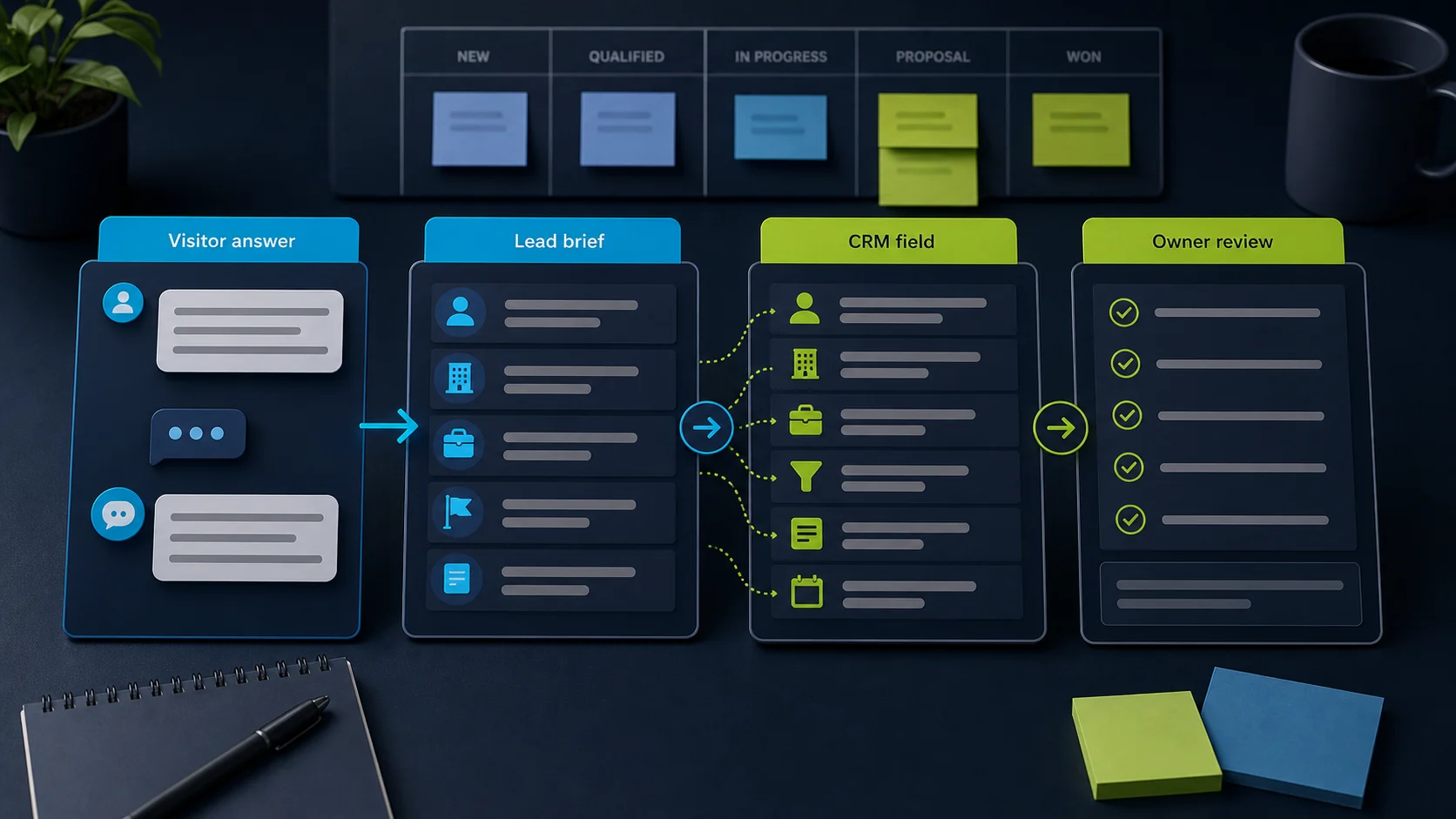
First route to test
Start with the lowest-risk path that proves a real person can follow up. We picked these four because their public docs show website lead capture plus a route toward Zapier, Make, webhooks, support inboxes, or CRM-style records. Some links may earn a commission, but the first test below is still yours to run before any production CRM write.
Simple website leads
Send one fake quote request to the owner inbox and a test log.
Webhook or custom-action proof
Submit one lead and inspect the Zap, webhook, or action payload before CRM writes.
Support inbox overlap
Run the widget flow and confirm the collected fields reach the right support owner.
Designed flow control
Test the question step, saved attributes, and Zap trigger in order.
Skip a chatbot-first CRM write if you need regulated handling, production record updates, dispatch promises, or hands-on-tested automation proof. Use an owner alert or test list until the route is boringly reliable.
What the visitor needs
What the chatbot should collect
Safe for the chatbot
A cleaner buying decision: choose the tool by the handoff you actually need.Needs a person or approved process
Do not let a chatbot update customer records until the exact field mapping, duplicate behavior, and failure path are tested.Yes, several AI chatbot tools can send leads toward a CRM. For most small teams, the practical shortlist is FastBots, Chatbase, Tidio, and ChatBot.com.
The right pick depends on the handoff. If you just need website enquiries sent to the right person, start simple. If the chatbot needs custom actions, support inbox ownership, or a designed scenario, check those paths before you buy. Pair this guide with implementation best practices so the CRM write step is the last thing you add, not the first.
CRM means the place your team keeps customer and sales records. This guide helps you choose the chatbot layer. The exact CRM field setup still needs a live workflow test.
Cost and limits check
For CRM lead routing, the bill can depend on usage volume, automation access, support seats, AI actions, webhook/API access, and the Zapier or Make plan that does the final handoff. We source-checked official pricing pages on June 6, 2026, but you should confirm the current plan gates before starting a trial.
Website-bot usage plus the Zapier or Make route you use after capture.
Confirm the plan covers the lead fields, integrations, and site volume you expect before you connect a real CRM.
Message credits, agents, actions, API/webhook needs, and workspace access.
Check the current pricing page against your expected lead volume and the custom-action or webhook path you plan to test.
Conversation volume, AI/chat automation needs, flow behavior, and support-inbox ownership.
Verify the package includes the flow, Zapier, Lyro Action, or live-chat path you need before treating it as a CRM route.
Active bot needs, designed-flow complexity, saved attributes, and automation handoff path.
Confirm the plan supports the Question, Add to leads, Zapier, Make, or webhook step you will rely on.
Treat any CRM write as a second budget check: the chatbot plan, the automation tool, and the CRM plan all need to support the same field path before you rely on it.
Lead source check
A CRM is only the destination. The buying decision starts with the conversation: website chat, Instagram/DMs, or WhatsApp. Pick the route that matches how the buyer actually reaches you.
Website lead
Use this guide's shortlist when the chatbot needs to answer from website pages, collect a brief, and send that lead to an owner, inbox, Zapier, Make, webhook, or CRM test list.
Use the CRM shortlistInstagram or DM lead
Treat this as a social-DM workflow first. A website chatbot can miss the real job if people comment for price, ask for links, or reply inside Instagram or Messenger.
Compare the DM pathWhatsApp lead
Check the WhatsApp route before choosing a website bot. The first job is usually shared inbox ownership, message handoff, lead context, and a clean follow-up path.
Check WhatsApp lead captureShortlist
Start here for a small site
Simple website lead routing
Start here if
Website owners and WordPress operators who want a chatbot to answer from their content, collect lead details, and send those details through Zapier or Make.Before you choose
The CRM write usually happens in Zapier or Make, so test field mapping, duplicates, and alerts before treating it as a production sales workflow.Inspect for custom workflows
Lead capture plus webhook/action paths
Start here if
Teams that want the bot to answer from approved pages or files, collect a lead, and then use Zapier, webhooks, or custom actions.Before you choose
A webhook or custom action is not the same as a safe CRM update. Check authentication, returned responses, failed runs, and who owns the workflow.Best when sales and support overlap
Support inbox and flow routing
Start here if
Businesses that want lead routing inside a broader live chat, support, contacts, and ecommerce support workflow.Before you choose
Tidio's Zapier flow data depends on the fields collected in the flow, and Lyro Actions need editor testing and current package checks.Best for controlled bot paths
Designed flows and attributes
Start here if
Teams that prefer a designed bot flow where Question actions save attributes before Zapier, Make, or webhook steps move the data.Before you choose
Designed flows are strongest when the path is explicit. Test the exact step, saved attributes, webhook response, and publish behavior.Pick by job
The same "send leads to CRM" phrase means different things for a local-service owner, a store, a consultant, and a solo founder. Choose the path that matches the follow-up problem.
Start with FastBots if the job is simple: answer common questions, capture the enquiry, and send a clean lead brief.
If live chat and inbox ownership matter more, compare Tidio next.
Start with Tidio when support, live chat, and store conversations sit together. Inspect Chatbase when answer control and action paths matter.
Keep order, refund, and account changes behind rules or human review.
Start with Chatbase if custom action or webhook proof is important. Start with ChatBot.com if you want a designed flow your team can control.
Use a test CRM list before writing to real contacts or deals.
Do not begin with the CRM. Begin with an email, sheet, or inbox notification so you can see whether the lead brief is actually useful.
Once the lead format is clean, connect Zapier, Make, or the CRM.
CRM ownership check
A chatbot can collect the enquiry and still leave the business with a follow-up problem. If the real question is "who owns this lead now?", inspect the CRM workflow before adding another chatbot feature.
The chatbot should capture the visitor's name, contact detail, need, urgency, source page, and consent before any CRM step tries to create a record.
A CRM is where the lead gets an owner, pipeline stage, task, note history, and next action. Capsule is one CRM to inspect for this handoff, based on official Capsule sources checked on June 6, 2026.
Sponsored link; official-source review only.
Send the lead to an inbox or test list before writing to real contacts or deals. We have not run a hands-on Capsule account test, so treat Capsule as a CRM-handoff candidate, not a scored recommendation.
Email nurture check
CRM routing decides who owns the lead. Email nurture decides what happens after the first reply, quote, booking, or newsletter signup. Treat AWeber and Campaign Monitor as downstream email tools to research after the capture and ownership path is clear.
We have source-checked both tools for this follow-up role, but we have not run hands-on email workflow tests. AWeber and Campaign Monitor are sponsored next-clicks only for post-capture email follow-up; neither is a chatbot, CRM owner, or tested automation workflow in this guide.
If the CRM owner is clear but leads still go cold, the next problem is usually a follow-up rhythm: newsletter drafts, segmented campaigns, onboarding emails, or reminders after the first reply.
AWeber is a source-checked option when the job is AI-assisted newsletter drafting and simple workflow follow-up after a chatbot captures a subscriber. We have not run a hands-on workflow test, so treat follow-up as a next-step hypothesis for low-risk teams.
Official-source-first guidance only: no hands-on workflow test has been published, and no pricing/performance promises are made in public copy.
Campaign Monitor is a source-checked option when the job is segmented campaigns, journeys, analytics, SMS, or deliverability-aware follow-up after capture. Its affiliate target currently lands on Campaign Monitor's official pricing path, so inspect it only after the follow-up job is clear.
Sponsored, official-source-first guidance only: no hands-on journey test, exact pricing, discount, or deliverability promise is made in public copy.
Worked example
Use this as a composite example for applying Capture / Route / Write / Follow up. It is not a hands-on run in FastBots, Zapier, Make, Capsule, AWeber, Campaign Monitor, or a live CRM account.
We would not let the chatbot create real deals until the owner alert, required fields, duplicate handling, and first follow-up task have passed a test lead.
01 / Capture
A visitor asks for weekly office cleaning. The chatbot should collect name, email or phone, suburb, office size, timing, source page, and permission to follow up before any automation tries to create a deal.
Useful proof: the owner can read the alert and understand the job without opening the chat transcript.
02 / Route
Send the same summary to the follow-up owner and a test sheet or inbox. If the quote size, location, or contact detail is missing, stop at human review instead of writing to the CRM.
Useful proof: one fake quote request lands with the right owner, source, fields, and review note.
03 / Write
Create or update a test contact and deal only after the route has passed. Check duplicate handling, owner assignment, pipeline stage, and whether the original lead summary is saved as a note.
Useful proof: the CRM has one clean test record, not two duplicates or an ownerless deal.
04 / Follow up
After the CRM owner is clear, the first email can be a human-reviewed quote summary, booking prompt, or nurture draft. AWeber or Campaign Monitor belongs here only after capture, routing, and CRM ownership are understood.
Useful proof: the email task matches the lead stage and does not promise pricing, availability, or dispatch without an owner.
Handoff worksheet
Treat the first chatbot-to-CRM route like a small acceptance test. The goal is not to prove the vendor is perfect. It is to catch missing fields, owner confusion, duplicate records, and risky promises while the lead is still fake.
This is a reader worksheet, not our hands-on test output. Use it with a trial account, a test CRM list, and one intentionally fake lead before connecting real contacts or deals.
01
Website owner or sales lead
The test lead includes name, contact detail, need, location or account context, urgency, source page, consent, and the exact chatbot route that captured it.
02
Follow-up owner
One fake enquiry reaches the right inbox, chat queue, sheet, or task list with enough context to reply without opening the transcript.
03
Workflow owner
The Zap, Make scenario, webhook, or integration log shows the same fields, a timestamp, and a visible failed-run path.
04
CRM owner
A test contact, lead, or deal is created once, assigned to an owner, placed in the right stage, and saved with the original lead summary.
05
Business owner
The first task or email matches what the business can actually promise, with pricing, availability, booking, or dispatch claims held for human review.
Buying lens
Capture
Route
Write
Capability matrix
Lead form details and custom fields
Official Zapier app and Make path for captured leads
CRM work is usually mapped in Zapier or Make
Send one fake quote request to an owner inbox and a test CRM record
Collect Leads details, plus custom forms/action inputs where configured
Zapier lead submission, webhooks, and Custom Action options
Good for custom workflows, but safer only after auth and failure behavior are tested
Submit a lead, inspect the webhook or Zap payload, then test one failed run
Fields collected through a Tidio flow
Send to Zapier flow action and Lyro Actions for API-style tasks
Best when lead routing belongs inside a support or chat workflow
Run the lead flow in the widget and confirm only collected fields are sent
Question actions save details as attributes; Add to leads can store lead data
Native Zapier integration plus Make/webhook patterns
Good for controlled paths where the trigger step is explicit
Test the block after the question step and confirm attributes appear in the Zap
Risk line
Send a clean summary to the person who follows up. This is the best first proof for most small teams.
Create a new CRM contact or lead only after the required fields, duplicate behavior, and owner assignment have been tested.
Log leads in a spreadsheet or reporting dashboard after the owner path works. Reporting should not replace the follow-up owner.
Changing contacts, deals, bookings, orders, accounts, or tickets needs stricter rules than sending a new lead.
If the workflow sends information back into the chat, test wrong IDs, missing data, API errors, and what the visitor sees.
Prices, discounts, availability, dispatch promises, legal, medical, financial, security, and safety requests need a qualified owner.
Related guides
Once the lead path is clear, check the handoff, automation risk, and first plan to inspect before you trial a tool.
Sources checked
Product details and plan gates change. Recheck the vendor docs and run your own CRM workflow test before relying on any chatbot to create or update real sales records.
FAQ
Check FastBots first for a simple website or WordPress lead route, Chatbase for webhook or custom-action paths, Tidio for support-inbox workflows, and ChatBot.com for designed flows that save attributes before routing.
Reviewed
Official docs show lead routing and integration paths, but safe CRM creates or updates still need a workflow test for required fields, duplicate handling, permissions, owner assignment, and failure alerts.
Reviewed
ChatBot.com 's help center frames Zapier as a handy tool designed for non-technical users that helps automate daily tasks by connecting various web apps into workflows, and the integration docs state you need to use Attributes to save the needed details from your customers before a Zap can read them. The practical flow is: Question action collects the field, the attribute is written, the Zap fires on a chosen block, and Zapier creates or updates the CRM record. The CRM write should be the last step you turn on, after duplicates, owner assignment, and failure alerts are tested.
Reviewed · Sourced from ChatBot.com Zapier integration
ChatBot.com 's webhook docs spell out the difference: Make webhooks support one- and two-way communication, while Zapier only allows for sending information out; you cannot return a message to the chat. So if the CRM workflow needs to send a confirmation, an account ID, or an error message back into the conversation, a Make webhook (or a custom endpoint) is the better path; if the bot just needs to file the lead, Zapier is faster to wire. Either way, test field mapping, duplicate handling, and a deliberate failure case before treating the CRM step as live. The [implementation guide](/guides/best-practices-for-implementing-ai-chatbots-in-small-businesses) explains why CRM creates should be added last.
Reviewed · Sourced from ChatBot.com webhooks with Make
Attributes have to exist. ChatBot.com documents that you can export data saved as attributes with the Zapier and Make integration or webhooks, and that you can use a maximum of 99 attributes in one interaction. In practice that means each field the CRM needs — email, name, company, intent, source page — must be captured into an attribute (usually via a Question action) before the Zap or webhook block fires. If the attribute is empty, the CRM record arrives empty. Audit attributes first, then turn on the routing.
Reviewed · Sourced from ChatBot.com attributes
Decision recap