ChatbotEdge

Shopify guide

Shopify chatbot claims need proof before they touch the cart.

Product recommendations are one thing. Order lookup, cart visibility, and account updates are another. This guide separates useful Shopify chatbot evidence from claims you should still test in your own store.

Short answer

For Shopify product recommendations, start with Tidio, Chatbase, and ChatBot.com. They each show a different kind of proof: Tidio for product recommendations and product cards, Chatbase for a broader documented Shopify action set, and ChatBot.com for configurable Shopify product and order-status flows.

The safest first rollout is still narrow: product questions, product suggestions, shipping and return policy answers, and a visible handoff path. Treat cart, order, profile, billing, refund, and checkout claims as store-specific tests, not default promises.

Risk frame

Shopify chatbot claims have levels.

A chatbot that can show product cards is not automatically a chatbot that should change billing details. Use these weights as a buyer checklist, not as a product score.

Decision weighting

What changes the risk

Editorial weighting for this Shopify guide.
Product recommendations Catalog proof
Order status Live data
Cart visibility Theme-sensitive
Human handoff Support edge
Pricing units Watch usage
Account actions Test first

Three evidence levels

Separate recommendations from operations.

The more a chatbot depends on customer-specific Shopify data, the more carefully you should test it before putting it in front of real shoppers.

01 / Start here

Product recommendations

This is the lowest-risk Shopify job: answer product questions, show relevant products, handle variants, and point shoppers to product pages.

Check: Look for Shopify product data, product cards, stock or variant handling, and a clear way to refresh product information.

02 / Verify closely

Order and cart visibility

Order status and cart contents are more useful, but they depend on live Shopify data, authentication, app embed behavior, and theme details.

Check: Test guest orders, logged-in orders, tracking links, cart state, and what happens when Shopify data is missing.

03 / Do not assume

Account or billing actions

Anything that changes profile, billing, checkout, refunds, or order state needs a much higher proof bar than a product-answer bot.

Check: Keep these behind a hands-on store test, tight permissions, and a human escalation path.

First shortlist

Four tools to inspect first.

This is a Shopify-specific starting point, not a universal ranking. The right first test depends on whether your store needs product recommendations, order-status flows, a support inbox, or simple store content answers.

Tidio

Product recommendation fit

Best when

Shopify stores that want product cards, stock-aware recommendations, live chat, ticketing, and a support workflow around Lyro.

Verify before relying on

Product schema quality, variant apps, stock apps, currency apps, and whether Lyro is included in the plan you would actually buy.

Check Tidio

Chatbase

Broad Shopify actions

Best when

Stores that want a broad documented Shopify action surface: products, orders, cart, profile, and billing-address actions.

Verify before relying on

Real-store behavior for add-to-cart, order lookup, cart retrieval, authentication, and any account-changing action before relying on it.

Check Chatbase

ChatBot.com

Visual Shopify flows

Best when

Teams that want configurable Shopify sales and support flows: product availability, product cards, order-status paths, and a visual builder.

Verify before relying on

Whether the flow approach fits your team better than a source-trained agent, and how order status behaves across real fulfilment cases.

Check ChatBot.com

FastBots

Broader store Q&A

Best when

Shopify stores that mainly need answers from product pages, shipping rules, return policies, FAQs, and store content.

Verify before relying on

Treat this as a content-trained ecommerce option here unless your own setup confirms stronger Shopify-native actions.

Check FastBots

Source check

What the documented action set looks like.

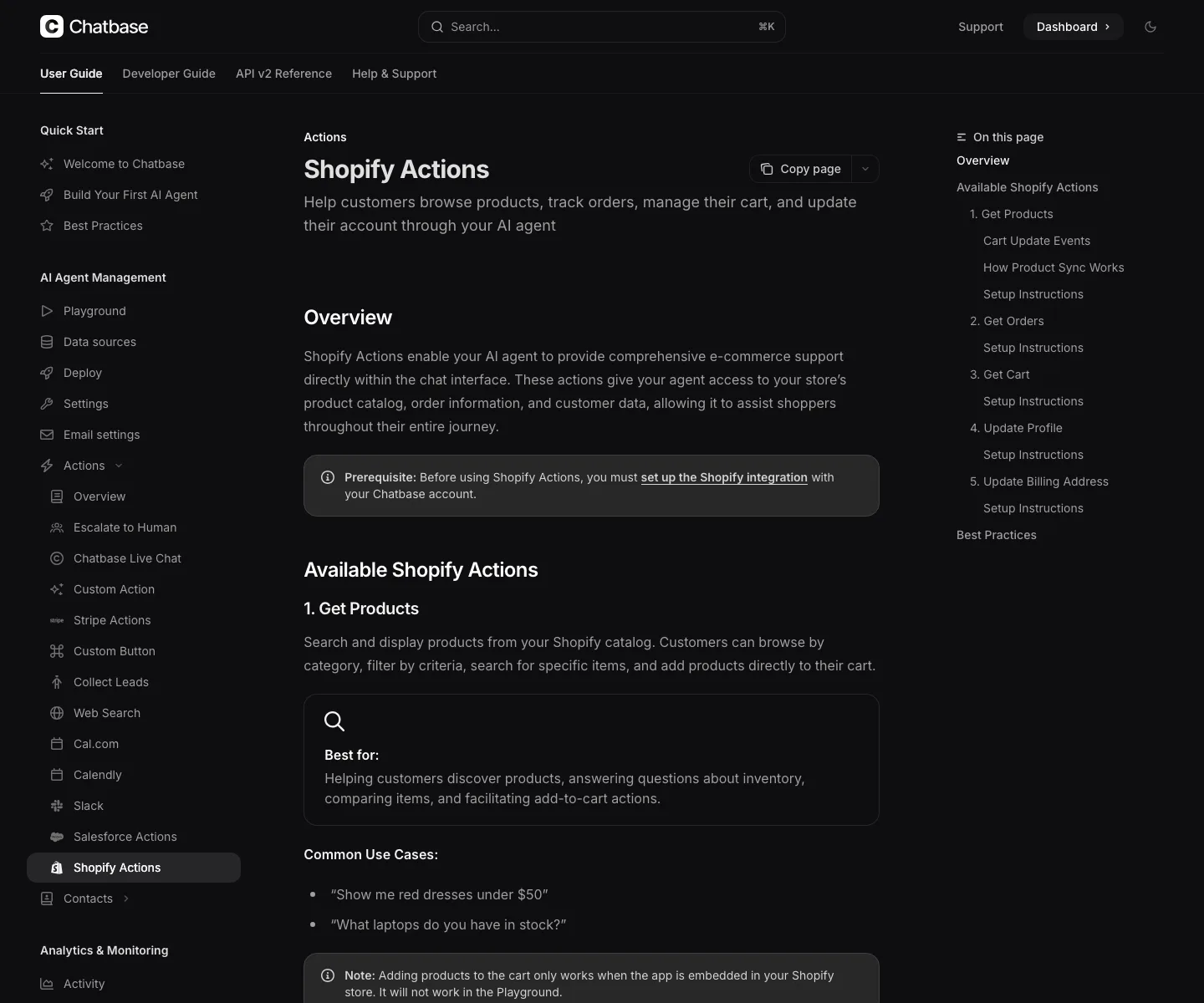
This public documentation screenshot was reviewed for the guide. It supports what the vendor documents, while keeping the live-store test caveat visible.

Chatbase Shopify Actions documentation page showing product, order, cart, profile, and billing address action categories.
Screenshot captured on May 24, 2026 from Chatbase's Shopify Actions docs. It is documentation evidence, not a live Shopify store test.

Before launch

Run the store-specific test set.

A Shopify chatbot can look impressive in a vendor demo and still fail your store's variants, fulfilment edge cases, return rules, or support handoff. Test the boring cases first.

Top five product questions

Can it answer using your real product detail, not generic category advice?

Variant and stock edge cases

Does it avoid recommending unavailable items or the wrong size/color?

Order-status path

What does it need from the shopper, and does it show the same status Shopify has?

Cart behavior

Does it work only inside the embedded widget, and does your theme react correctly?

Human handoff

What happens when product data is missing, the order is delayed, or the shopper is angry?

Account-changing actions

Can you disable, limit, or supervise anything that changes profile, billing, or order state?

Sources checked

Official sources behind this guide.

Sources were checked on May 24, 2026. Recheck vendor pages before relying on exact pricing, plan packaging, Shopify permissions, or platform-specific action claims.

For broader ecommerce product-question context, see AI chatbots for ecommerce product questions. For the Tidio-specific product-recommendation path, see Tidio Product Recommendations for Shopify. For the order-status workflow specifically, see which Shopify chatbots can answer order-status questions. For Chatbase's broader Shopify action surface, see Chatbase Shopify Actions.