
Dental practice buyer guide

Best AI chatbot for dentists: capture new patients, never play clinician.

A dental chatbot should make the front desk faster: new-patient questions answered from approved copy, appointment requests captured cleanly, emergencies routed to the phone. It should not diagnose, quote fees, estimate coverage, or invite patients to describe symptoms in chat.

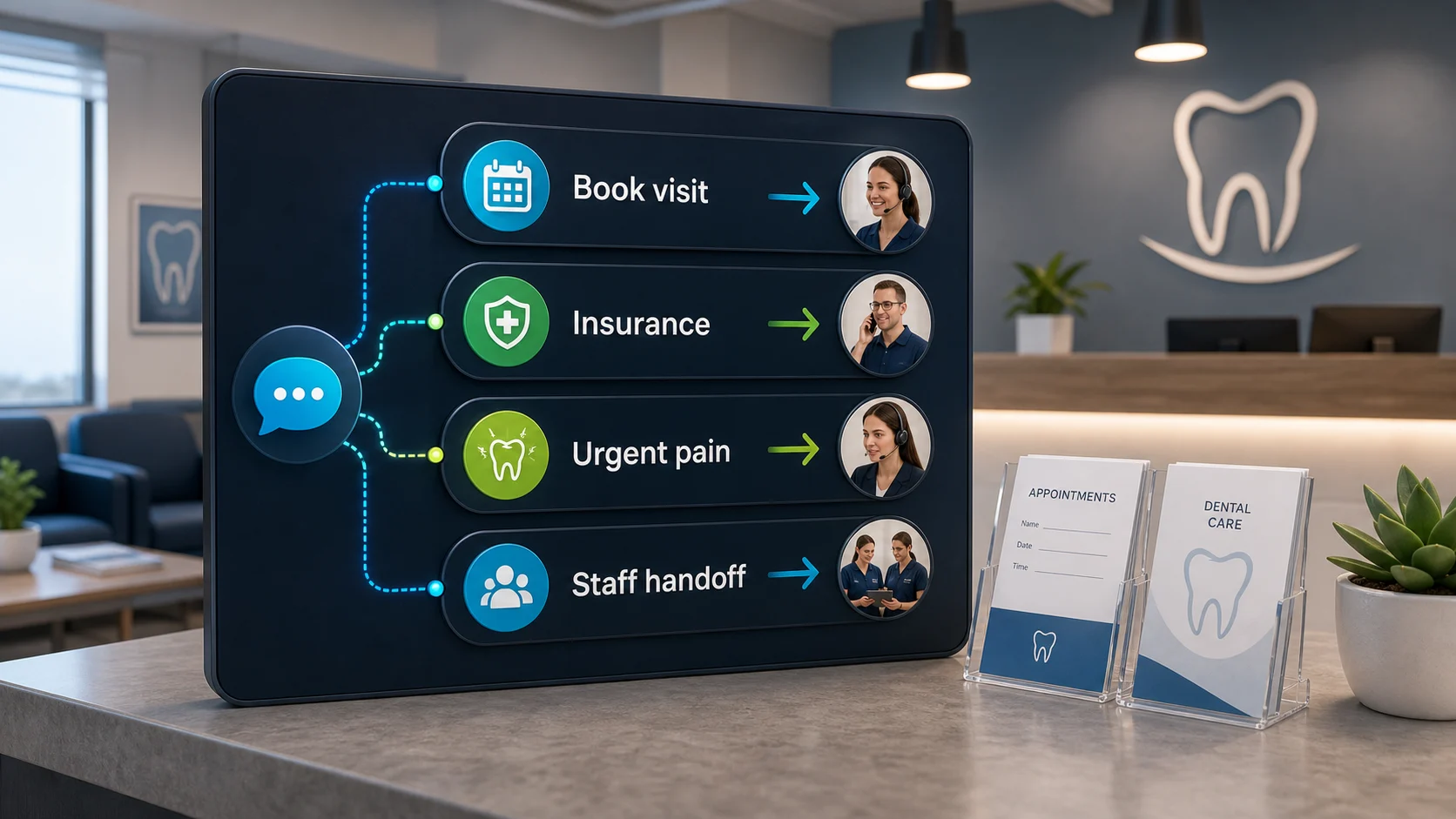
Dental reception with chatbot routing for visit booking, insurance questions, urgent pain, and staff handoff.

What the visitor needs

Catch the enquiry, keep the clinical work human.

A visitor asks about new-patient availability while the front desk is with patients. The chatbot answers from approved copy, collects the request, and routes the next step.

What the chatbot should collect

Need
Check-up, cleaning, consult
Context
New or existing, window
Risk
Symptoms, fees, coverage
Handoff
Front desk, phone for urgent

Safe for the chatbot

A cleaner callback list for reception without turning the chat widget into a clinical or compliance problem.

Needs a person or approved process

No diagnosis, fee quote, coverage estimate, confirmed slot, or prompting for medical detail.

Short answer

Start with FastBots if you want a simple site-trained assistant for new-patient questions and appointment-request capture. Look at Chatbase if tightly controlled answers from approved practice pages matter most. Choose Tidio when the front desk should take over chats live during office hours, and ChatBot.com when a larger practice wants designed intake flows and team features.

The first win is not a bot that answers dental questions. It is a cleaner callback list: who asked, how to reach them, new or existing patient, what window suits them — collected around the clock, including the after-hours enquiries the phone currently loses.

Dental adds two boundaries most industries do not have: anything clinical belongs to the dental team, and detailed health information should stay out of the chat window entirely — in the US, collecting it can trigger HIPAA obligations most chatbot tools do not advertise meeting.

Pricing snapshot

What the shortlist costs before you trial it.

Front-desk relief has to pay for itself. Compare the current range and usage unit against your enquiry volume before choosing.
Current as of 1 June 2026 - 7 June 2026

FastBots

Website AI chatbot

Website chat Small websites that want a trained chatbot without a broader AI-agent buildout.
Cheapest paid plan $33/mo annually Essential plan

Monthly: $39/mo

Includes: 2,000 message credits/mo across 2 bots; standard replies use 1 credit.

Typical price range
$0 to $399/mo; main paid plans run $39-$199/mo
What raises the bill
Message credits (1 standard reply = 1 credit; advanced models use 5-10), chatbot count, handoff, and branding gates

Check current price

Chatbase

Trainable website chatbot

Website chat Teams with help pages, files, Q&A, Notion, or support-ticket sources to manage.
Cheapest paid plan $32/mo annually Hobby plan

Includes: 500 message credits/mo, 1 AI agent, and 5 AI Actions/agent.

Typical price range
$0 to $400/mo annually; Enterprise is custom
What raises the bill
Message credits, AI agents, source limits, actions, seats, and add-ons
Check current price

Tidio

Website chat and support

Live support Stores that need live chat, AI help, and human handoff in one workflow.
Cheapest paid plan $24.17/mo annually Starter plan

Includes: 100 billable conversations/mo; Lyro AI is separate, with the first 50 conversations lifetime free.

Typical price range
$24.17/mo Starter to $749/mo Plus; Premium is custom
What raises the bill
Billable conversations, Lyro AI conversations, Flows visitors reached, and seats
Check current price

ChatBot.com

AI support workspace

Website chat Teams comparing AI agent, live chat, shared inbox, ticketing, and workflows in one Text workspace.
Cheapest paid plan $19/user/mo Essential plan

Monthly: $25/user/mo

Includes: 1 AI agent, 10 AI resolutions/mo, and 10,000 API calls.

Typical price range
$19-$79/user/mo annually; Enterprise is custom
What raises the bill
Per-user pricing plus included AI agents, AI resolutions, API calls, and workflow allowances
Check current price

Dental practice workflow

The bot should make the front desk faster, not braver.

A useful dental chatbot is an intake and routing layer, not a clinician, fee schedule, insurance verifier, or scheduling system. It separates routine practice questions from the clinical, money, and record workflows that need people and tested systems.

What matters most

What matters for dental practices

A quick read on what matters for this buying decision.
New-patient questions Core job
Appointment requests Front desk relief
Accepted-insurer answers Approved copy only
After-hours capture Missed-call leak
Human handoff Trust
Clinical or fee promises Never automate

Choose the right layer

Website chatbot, booking link, or practice system?

Scheduling language blurs three different jobs. Keep request intake, booking links, and practice-management operations separate before choosing a tool.
01

Website layer

Practice website chatbot

Best for new-patient FAQs, hours, location, accepted-insurer lists, first-visit explanations, and appointment-request intake.
  • Practice FAQs
  • Request intake
  • Insurer list
  • Callback path
02

Scheduling layer

Booking link or tested calendar action

Useful when patients should pick a slot through a scheduling link the practice already trusts, with fallback rules for no availability and reschedules.
  • Booking link
  • Slot rules
  • Fallbacks
03

Practice layer

Practice management system

Needed when the workflow touches patient records, charts, recalls, treatment plans, payments, or insurance verification — compliance requirements live here too.
  • Patient records
  • Recalls
  • Payments
  • Verification

Shortlist

Which tool should you check first?

Current ChatbotEdge-reviewed tools that fit dental-practice website work. Practice-management, recall, and patient-communication systems are a separate category this guide does not score.

Lead capture

FastBots

Simple practice intake

Start here if

Practices that want a simple site-trained assistant for new-patient questions, hours, accepted-insurer lists, first-visit explanations, and appointment-request capture.

Before you choose

Treat it as intake plus follow-up by the front desk. Do not frame it as live scheduling, insurance verification, or anything that invites patients to describe symptoms in detail.
Check FastBots

Answer control

Chatbase

Source-controlled answers

Start here if

Practices that want tightly controlled answers from approved pages — services, policies, insurer lists — with a configurable calendar-action path to inspect for booking links.

Before you choose

Source control reduces wrong answers; it does not make the tool a compliance solution. Keep intake minimal and route clinical topics to the phone.
Check Chatbase

Handoff

Tidio

Inbox and handoff

Start here if

Front desks that want AI answers plus live chat and operating-hours behavior, so a person can take over conversations during office hours.

Before you choose

Inbox handoff is the strength; keep fee quotes, coverage estimates, and clinical questions out of automated replies.
Check Tidio

Flow design

ChatBot.com

Designed flow capture

Start here if

Larger or multi-location practices that want designed question flows, saved attributes, and team workspace features around patient enquiries.

Before you choose

Designed flows collect cleaner requests, but per-user pricing scales with seats and flows are not proof of practice-management integration.
Check ChatBot.com

Appointment-request flow

From patient enquiry to useful handoff.

Collect enough context for reception to reply faster, then stop before the chatbot becomes a clinician, fee schedule, or scheduling system.
01 Visitor asks

A patient enquiry lands

The visitor asks about new-patient availability, cleanings, whitening, emergencies, accepted insurers, parking, hours, or what a first visit involves.

02 Bot collects

Capture the appointment-request brief

Ask for name, contact details, new or existing patient, preferred time window, and a short reason for the visit in the patient's own words — without prompting for medical detail.

03 Boundary check

Keep clinical and money questions human

The chatbot can answer from approved practice copy, but diagnosis, treatment advice, procedure fees, insurance coverage estimates, and confirmed slots stay with people and tested systems.

04 Handoff

Route to the front desk

Reception gets a cleaner callback list, urgent cases get the phone number immediately, and nothing clinical is decided in the chat window.

What the chatbot should collect

The questions that make follow-up cleaner.

New-patient question

The visitor asks whether the practice takes new patients, what a first visit involves, or how soon they can be seen.

Answer from approved practice copy and collect contact details plus a preferred window for the front desk to confirm.

Appointment request

The visitor wants a cleaning, check-up, whitening consult, or a specific dentist or hygienist.

Collect name, contact, new/existing patient, preferred window, and provider preference. Do not confirm a slot without a tested scheduling path.

Insurance question

The visitor asks whether you take their insurance or what it will cost.

Answer the accepted-insurer list from approved copy only. Offer to collect details for the office to verify benefits — never estimate coverage or out-of-pocket costs.

Emergency or pain

The visitor mentions severe pain, swelling, a knocked-out tooth, bleeding, or trauma.

Show the practice phone number immediately and route to the emergency instructions. Do not triage severity or give clinical advice in chat.

Clinical detail offered

The visitor starts describing symptoms, conditions, medications, or treatment history.

Politely redirect to a callback or phone call without prompting for more. Collecting health details in chat raises compliance requirements most chatbot tools do not advertise meeting.

Setup checklist

Set the rules before the first after-hours enquiry.

Define minimal intake fields: name, contact details, new or existing patient, preferred window, provider preference, and a short free-text reason — with instructions not to prompt for medical detail.

Write approved wording for services, hours, location, parking, accepted insurers, payment options, first-visit steps, cancellation policy, and emergency instructions.

Add service pages, new-patient pages, insurer lists, policy pages, and FAQ pages as training sources; exclude anything with patient information.

Tell the chatbot to route, not decide: no diagnosis, no treatment advice, no fee quotes for procedures, no coverage estimates, no confirmed slots.

Put the emergency phone path above everything: pain, swelling, trauma, and bleeding always show the phone number first.

Send transcripts to the front-desk inbox and test new-patient requests, insurer questions, emergency wording, after-hours behavior, and handoff failures before expanding automation.

What the chatbot should not decide alone

Safe first jobs, and what a person should keep.

The safest dental chatbot gathers contact details and answers from approved practice copy. It should not touch clinical judgment, fees, coverage, or patient records.

Safe first jobs

Collect appointment-request details

Name, contact details, new or existing patient, preferred window, provider preference, and a short reason in the patient's own words.

Answer approved practice FAQs

Hours, location, parking, accepted insurers, payment options, first-visit steps, and cancellation policy from approved copy.

Route urgent and clinical cases

Pain, swelling, trauma, symptom descriptions, coverage questions, and fee questions go to the phone or front desk immediately.

Keep with a person

Anything clinical

Diagnosis, triage, treatment advice, medication questions, and suitability for procedures belong to the dental team, full stop.

Money and coverage

Procedure fees, payment plans, insurance coverage and benefits estimates need a person with the patient's actual plan in front of them.

Scheduling commitments

Confirmed slots, provider assignment, reschedules, recalls, and reminders need a tested scheduling workflow, not chatbot improvisation.

Do not automate first

  • Diagnosis, triage, treatment recommendations, medication advice, or any response to described symptoms beyond routing to the phone.
  • Procedure fee quotes, payment-plan terms, insurance coverage or benefits estimates, or financing decisions.
  • Confirmed appointment slots, provider assignment, reschedules, or recall/reminder behavior without a tested scheduling workflow.
  • Patient-record, chart, treatment-plan, or practice-management writes unless the integration is official, tested, permissioned, and reversible.
  • Collecting detailed health information in chat — in the US this can trigger HIPAA obligations (including business associate agreements) that general-purpose chatbot tools do not advertise meeting; confirm your setup with a compliance advisor.

Specialist systems

When a chatbot is not enough.

If the real problem is recalls, reminders, insurance verification, patient communication at scale, or filling cancellations, that is practice-management and patient-communication software territory — a website chatbot only solves the first step of that funnel.

We kept this shortlist to tools ChatbotEdge can describe from official sources. None of them are practice-management, recall, or compliance systems, and we do not claim otherwise.

A practical split: the website chatbot captures and qualifies the enquiry; the practice system owns records, schedules, recalls, and payments. If phone calls are the bigger leak than website chats, fix missed-call attribution first — the lead-capture guide covers the phone-layer split.

Sources checked

What this guide is based on.

Product details change. Check current vendor docs before giving a chatbot any role beyond intake and approved-copy answers, and confirm regulated-data handling with your own compliance advisor.

For the wider decision, the small-business chatbot picks page maps every starting point, the affordable chatbots guide compares entry prices, and the appointment-booking guide covers the calendar-specific claims.

FAQ

Dental practice chatbot questions.

What should a dental practice automate first with a chatbot?

Start with the front-desk work that does not touch clinical judgment: answering approved questions about hours, location, parking, accepted insurers, new-patient steps, and what a first visit involves; and collecting appointment-request details — name, contact, preferred window, new or existing patient, and a short reason for the visit in the patient's own words. That gives reception a cleaner callback list without the chatbot deciding anything clinical. Keep diagnosis, treatment advice, fees for specific procedures, and confirmed scheduling out of the first project.

Reviewed

Can a dental chatbot answer insurance questions?

It can safely answer one kind: which insurers and plans the practice accepts, taken word-for-word from approved practice copy. It should not estimate coverage, benefits, out-of-pocket costs, or whether a specific procedure will be covered — those depend on the patient's individual plan and are exactly the promises that create front-desk disputes later. A good pattern is: answer the accepted-insurer list, then offer to collect the patient's details so the office can verify benefits before the visit.

Reviewed

Do dental practice chatbots have HIPAA issues?

They can, and US practices should treat this as a real design constraint rather than fine print. Once a chatbot collects health information tied to an identifiable person — symptoms, conditions, treatment history — that data can fall under HIPAA, which has requirements most general-purpose chatbot tools do not advertise meeting (such as signing a business associate agreement). The practical low-risk pattern: keep the chatbot to general practice information and minimal contact capture, avoid inviting detailed symptom or history descriptions, and route anything clinical to a phone call. Confirm your specific setup with a compliance advisor; this is general information, not legal advice.

Reviewed

How do I pick an AI chatbot for a small business?

Pick by the job before you pick by the vendor. Write down the first lost conversation in plain English — missed enquiries from service pages, repeat product questions, DMs that go unanswered, support replies that pile up overnight, or quote requests that need a person. Then match the surface: a website chatbot for site pages, a social-DM tool for comments and DMs, a WhatsApp tool for WhatsApp follow-up, a support-workspace tool when tickets and team inbox matter. Only after the job and surface are clear should you compare plans, pricing units, and handoff. The [small-business chatbot plan picker](/guides/chatbot-plan-picker-small-business) walks through the same sequence.

Reviewed

Decision recap

Pick a dental practice chatbot: the short version.

  • Start with FastBots — if the practice wants simple new-patient intake plus FAQ answers from approved copy.
  • Check Chatbase — if tightly controlled answers from approved practice pages are the main concern.
  • Check Tidio — if the front desk wants to take over chats live during office hours.
  • Check ChatBot.com — if a larger or multi-location practice needs designed flows and team features.
  • Route to the phone — for pain, swelling, trauma, symptoms, fees, coverage estimates, and anything clinical.