Use this when
- you do not know whether the next fix is website answers, human takeover, lead capture, routing, phone, or admin follow-up
- your team loses context after chat and needs one owner for the next action
Support workflow map
Use this workflow map before buying another tool: decide who answers, who takes over, where the transcript or lead goes, and whether the next step belongs in a support inbox, WhatsApp or Instagram, phone call, CRM, or paperwork process.
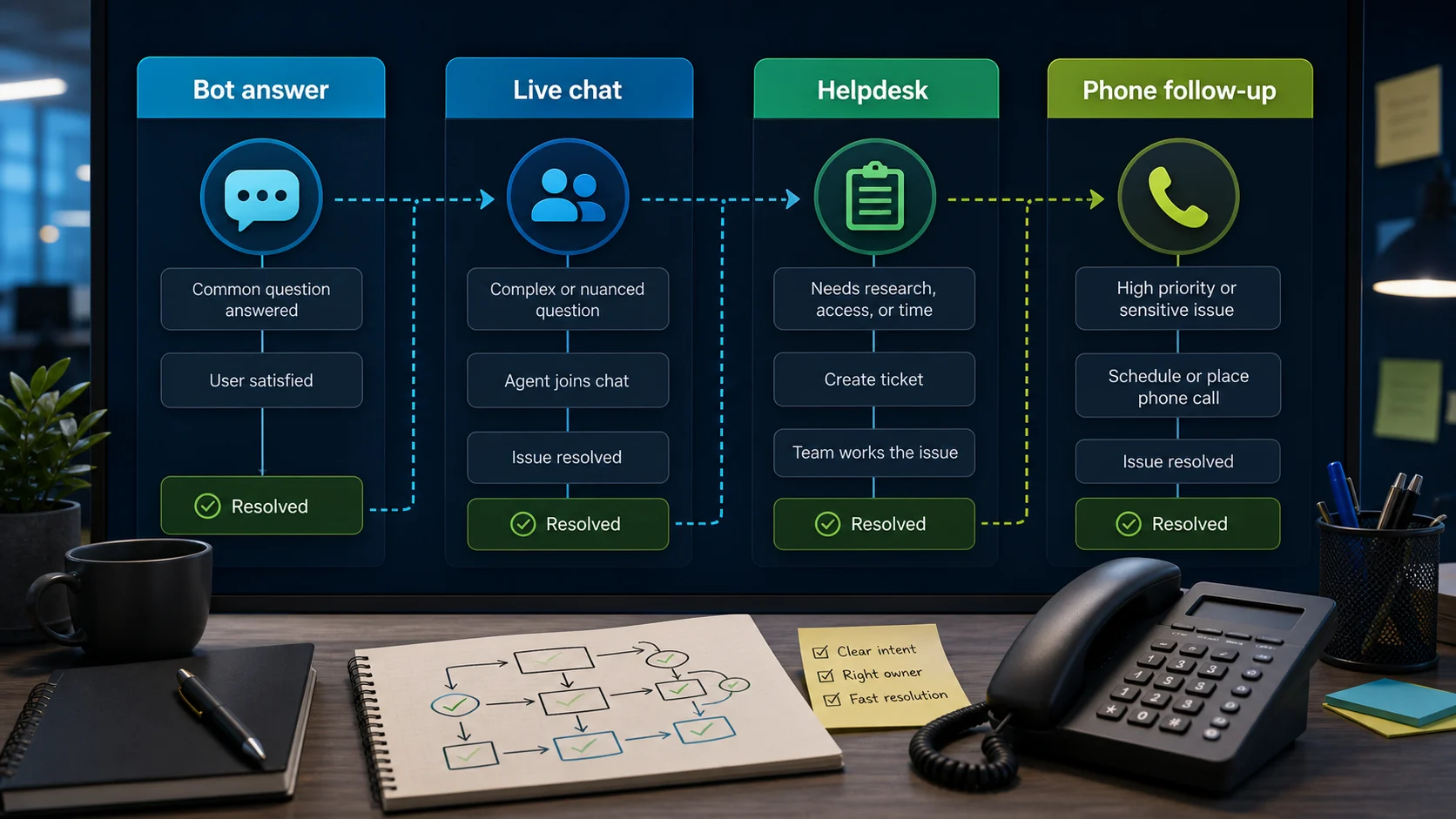
If customers ask simple published questions, a website-answer chatbot may be enough. If they need reassurance, account help, a refund, a quote, a call, or a real person, the chatbot is only one part of the support path.
The practical question is not "which chatbot is best?" It is "who owns the next useful step after the visitor asks for help?" Answer that first, then compare tools against the workflow.
Jump back in
Workflow first
Start with website pages, FAQs, policy text, product information, and support docs before adding inbox or CRM complexity.
Decide whether the next step is live chat takeover, a support ticket, an email reply, a callback, or a structured lead form.
Map the receiving inbox, CRM, WhatsApp or Instagram workflow, calendar, phone queue, or admin tool before buying the chatbot.
Keep quotes, refunds, sensitive account actions, urgent cases, and incomplete source answers out of unattended automation.
Support Ownership Ladder
A practical owner can apply this once per support bottleneck: what belongs to automation, what must be owned by a person, and which route must own outcomes.
Answer: Is this a routine, answerable question from approved docs?
Keep this in the chatbot layer and route only unresolved cases forward.
Takeover: Is the visitor asking for human assurance, account help, or escalation?
Move to live support or helpdesk and require a named owner.
Route: Does the case need CRM, channel follow-up, or booking flow ownership?
Capture transcript + context and send to the route that owns that job.
Review: Should finance, paperwork, or refunds happen by automation?
Hold these to a person unless policy and audit trail are already documented.
Support layers
Website answers
Human takeover
Lead capture
CRM routing
Messaging channel
Phone follow-up
Admin follow-through
Custom agent
Decision depth
Each scenario maps to a narrow next action. If you can answer the question and choose the next owner, you can compare tools against the workflow instead of shopping from a feature list.
Who is actually responsible for callback, quotes, and closure?
Pause new vendors. Fill the Support Ownership Ladder for the current lead, then open the guide that matches that owner path.
Why does the same problem return in the same session?
Move that flow back to website answers first, then tighten the transfer rule before expanding channels.
Are we collecting enough context to hand off safely?
Tighten lead capture fields and route the transcript through a single inbox before testing phone/chat channel changes.
Does every case have a named owner and destination?
Treat this as a routing-definition task and apply the workflow row for each layer before changing tools.
Two-week workflow test
Use this as a small pilot worksheet, not a production benchmark. It shows what to record, who owns the handoff, where the case lands, and what would count as a useful outcome before you add CRM, phone, helpdesk, or admin automation.
| When | Test job | Record | Owner | Outcome check |
|---|---|---|---|---|
| Day 1 | Choose one support bottleneck | Pick one flow: repeat website questions, late handoff, missing lead context, callback follow-up, or admin paperwork. | Business owner or support lead | One written test flow with a stop rule for anything the chatbot should not promise. |
| Days 2-3 | Write the fields the handoff must capture | Name, phone or email, issue type, urgency, page where the question started, last customer question, and preferred callback window if relevant. | Person who will receive the transcript | A transcript summary that lets the owner respond without asking the customer to repeat basic details. |
| Days 4-10 | Route every test case to one destination | Owner inbox, helpdesk queue, test lead sheet, CRM test record, WhatsApp queue, phone callback list, or admin task list. | Named destination owner | No captured case is left without a destination or a person accountable for follow-up. |
| Days 11-14 | Review outcomes before adding tools | Count duplicate questions answered, late handoffs, incomplete fields, callback delays, and cases that still needed owner judgment. | Owner plus the person who handled follow-up | A clear decision: keep website answers narrow, add human takeover, tighten lead fields, route to CRM, or keep phone/admin follow-up human-owned. |
This worksheet is a template for your own test. It is not a claim that ChatbotEdge ran a live production workflow across the tools named on this page.
Workflow map
Use this table when support is leaking but the fix is not obvious. Each row turns one operational problem into a narrower guide or comparison to open next.
| Layer | Customer problem | Next step | Useful click |
|---|---|---|---|
| Website answer | Customers keep asking the same published questions. | Check whether a chatbot can answer from approved website content before adding handoff. | |
| Human takeover | The visitor needs a person, or the bot should stop guessing. | Decide whether you need same-chat takeover, a ticket, or a later reply with transcript context. | |
| Lead capture | You need contact details before calling, quoting, booking, or replying. | Write down the smallest useful lead brief and where it should arrive. | |
| CRM or workflow routing | A captured lead is useless if it lands in the wrong place. | Choose whether the handoff belongs in CRM, Zapier, Make, a webhook, or a human-owned inbox. | |
| Messaging channel | Your buyer starts in Instagram comments, DMs, or WhatsApp instead of your website. | Pick the channel workflow before comparing website chat widgets. | |
| Phone or admin follow-up | The next useful action is a call, paperwork, invoice, or owner review. | Use the chatbot to collect context, then keep the decision and follow-through with the responsible person. |
Worked example
Imagine a local plumbing team, "Harbor Plumbing," gets repeat chats on open hours, late-night urgent leaks, and quote follow-up. Before the pilot, issue type, phone number, postcode, and requested service window were scattered across chat transcripts and inbox notes, so the owner could not quickly tell which conversations needed a callback, a quote, or just a better website answer.
What changes first? Harbor maps "Are you open?" and "What service windows are available?" to approved website answers. The chatbot answers only those two information jobs and transfers booking pressure, quote requests, and urgent leak language to a person.
2How is handoff made obvious? When a user asks for an emergency booking, the flow moves to live assistant takeover and collects only the fields the owner needs next: name, phone, postcode, issue type, urgency, preferred callback window, and the last question asked. The handoff owner is the duty manager, not "whoever checks the inbox."
3Where does the request land? The transcript lands in an owner-inbox row labelled "Callback needed" and a test lead sheet, not straight into a production CRM. From there, the owner can use the quote/lead guide to decide which fields belong before a CRM workflow or phone follow-up route is added.
| Before the pilot | After the pilot | What to measure |
|---|---|---|
| One shared inbox mixed simple hours questions with urgent jobs. | Website-answer chats stay automated; callback requests get a named duty-manager owner. | How many callback-needed chats are assigned within the same business day. |
| Phone number, postcode, issue type, and callback window were often incomplete. | The live handoff captures those fields before the transcript reaches the owner inbox. | How many owner callbacks need a second "can you send the details?" message. |
| Quote follow-up depended on whoever remembered the conversation. | The request lands in a test lead sheet first, then graduates to CRM only after the fields and owner rule work. | Callback completion, handoff completion, and quote response time across two weeks. |
This composite example is based on an anonymized workflow pattern, not a single public case study or a ChatbotEdge production test. For real proof, Harbor's team would run one dated two-week pilot and keep the transcript fields, handoff owner, routing destination, and outcome log before adding more channels.
Pilot thresholds for a quick first-week check:
| Layer | Metric | Pilot trigger | Narrow next action |
|---|---|---|---|
| Website answer | Duplicate-question pressure | If the same 3-5 top questions account for 35%+ of chats | Keep answers on website content + bot first, then add stronger handoff rules. |
| Human takeover | Late handoff rate | If >15% of sessions require transfer after 2+ back-and-forths | Move those flows to live takeover earlier and shorten the fallback script. |
| Lead capture | Lead form completion | If first-pass conversion is under 60% with too many required fields | Drop to name + phone + short context, then add fields in follow-up. |
| Routing | Ownership clarity | If any inbound item has no designated owner, inbox, or handoff destination | Block that case and force the route to a defined owner/path before opening more channels. |
| Phone/admin follow-through | Pilot completion | If callbacks take longer than 24h or manual recap is inconsistent | Keep chatbot automation narrow and force callback/admin handoff to a paper trail. |
Risk boundary
Let the chatbot answer routine questions only when the source text is current and the answer does not create a commitment.
Collect name, email, phone, order detail, quote brief, issue summary, and the page where the visitor asked for help.
Send the conversation to the selected inbox, ticket queue, CRM path, or channel workflow when ownership is already clear.
Point the visitor to a relevant guide, plan finder, comparison, booking page, or form when the next step is obvious.
The chatbot can collect facts, but price, refund, billing, eligibility, and account changes need an approved workflow.
Medical, legal, financial, security, safety, emergency, and high-emotion cases should route to a responsible person quickly.
Do not assume chatbot, live chat, phone, CRM, and paperwork tools will work together until a trial proves the handoff path.
If the source does not support the answer, the better customer experience is a clear escalation instead of confident-sounding filler.
Cost levers
Pricing pages change often, so treat this as a buying checklist rather than a price snapshot. The main risk is buying a cheap chatbot and then discovering the real cost sits in seats, usage, routing, phone coverage, or admin follow-through.
| Layer | What can change the bill | Buyer check |
|---|---|---|
| Website-answer chatbot | message credits, AI replies, training data size, crawl-page limits, active bots or agents, and extra source refreshes | Start here when repeat website questions are the bottleneck; check whether your busiest week would burn through the included usage. |
| Live chat or helpdesk | team seats, billable conversations, AI resolutions, ticket history, visitor tracking, permissions, and reporting | Use this layer when a person owns the outcome; check whether every responder needs a paid seat or only the support owner does. |
| CRM, Zapier, Make, or webhook routing | workflow runs, API access, action limits, CRM seats, integration tier gates, and retry/error handling | Do not price the chatbot alone if the lead still needs paid routing, tagging, assignment, or sales follow-up. |
| WhatsApp, Instagram, or phone follow-up | channel rules, templates, conversation charges, call minutes, callback ownership, and after-hours coverage | Choose this only when the buyer already starts in that channel or the next useful action is a call. |
| Admin and back-office follow-through | invoice, receipt, refund, document, bookkeeping, and approval steps that still require a person or a separate tool | Keep this out of the chatbot budget unless the workflow is already documented and someone owns exceptions. |
Phone layer
CloudTalk is one phone/support stack candidate to inspect when the problem is phone follow-up after a chatbot or form lead: missed-call handling, callback routing, call logs, CRM or helpdesk context, or AI voice intake. Treat it as a phone layer, not a website chatbot.
ChatbotEdge has reviewed official CloudTalk sources only. We have not tested CloudTalk account setup, call flows, AI VoiceAgents, billing preview, CRM or helpdesk sync, recording, transcript export, or human transfer hands-on.
Before treating CloudTalk as your phone layer, recheck current plan, calling, number, add-on, AI voice, integration, recording/privacy, fair-usage, and overage terms for your country and support workflow.
Admin layer
Dext is one bookkeeping/admin tool to inspect later when the next step is a receipt, invoice, expense, document, ecommerce sales record, or accounting handoff. Its public pages cover receipt and invoice capture, accounting integrations, and AI Assist, but ChatbotEdge has not run a hands-on Dext account test.
Before connecting any admin tool, recheck pricing, document volume, add-ons, permissions, accounting sync behavior, and whether a person reviews records before they reach customers or accounting software.
Plan the paperwork checkpointBuyer checklist
A skeptical buyer should be able to read the first screen, understand the evidence limit, and know which workflow question to answer next. Use this checklist to avoid buying the most visible feature instead of the missing support step.
Who owns the first answer: website content, AI, live chat, helpdesk, phone, or admin?
What question should the chatbot answer automatically because the source is approved?
What question should trigger a person, ticket, or callback?
What details must travel with the transcript so the customer does not repeat themselves?
Where should a lead or support case arrive: inbox, CRM, WhatsApp, Instagram, calendar, phone queue, or back office?
What happens when nobody is online?
What should the chatbot never promise without approval?
Which guide, plan filter, or comparison should the team open after this workflow is named?
Which vendor claim should stay out of the buying decision until someone checks the current source?
What would prove the workflow in a trial without needing a full production rollout?
FAQ
Buy the workflow first. If most questions can be answered from approved website content, start with a website chatbot. If visitors often need a person, start by checking human takeover, ticketing, and support inbox behavior.
Reviewed
No. A helpdesk is where support work is owned and resolved. A chatbot can answer simple questions, collect context, and route conversations into a helpdesk, but the handoff path still needs to be checked.
Reviewed
Phone follow-up matters when the next useful step is qualification, urgency checking, quote discussion, appointment confirmation, or service scheduling that should not be promised by the chatbot alone.
Reviewed
Documented behavior varies. Chatbase 's Escalate to Human action says it will "Create a new ticket or conversation in the selected platform Transfer the relevant conversation history Include user information (if available)" when it fires. ChatBot.com 's LiveChat integration documents Transfer and Send transcript as actions, so the agent can pick up mid-conversation without the visitor repeating themselves. The right buyer question is whether the receiving inbox (helpdesk, LiveChat, Zendesk, Intercom) is one you already use. Cross-check the receiving tools against /guides/which-ai-chatbots-support-human-handoff before buying.
Reviewed · Sourced from Chatbase Escalate to Human docs , ChatBot.com LiveChat integration
Write the after-hours rule before buying any tool. A reasonable workflow: the bot answers approved questions from your website content, collects the visitor's name, email, and question, and tells them when a person will reply. FastBots positions the after-hours job explicitly on its lead-generation page: "Most enquiries arrive in the evenings and at weekends. The chatbot qualifies and books interest 24/7 so you're not opening Monday's inbox to find a competitor already got the reply in first." The chatbot is collecting context; it is not promising live response. Map that promise to the handoff layer covered in /guides/which-ai-chatbots-support-human-handoff.
Reviewed · Sourced from FastBots lead generation use case
Some tools document the same bot running across multiple channels. FastBots advertises: "Plug the same bot into WhatsApp, Instagram, Facebook Messenger and Telegram. A lead that drops into your DMs gets the same qualification treatment as one from the website." That changes the workflow question from "which channel widget" to "who owns the inbox for each channel." WhatsApp adds template rules, opt-in, and per-country message costs that the website widget does not have. Use /comparisons/ manychat -vs- wati when WhatsApp is the dominant channel, and keep website-source training separate from social-DM qualification.
Reviewed · Sourced from FastBots lead generation use case
If the repeat questions are all about existing policies, hours, services, and returns, keep the chatbot owner at website answers first. Train it with approved pages, then set escalation rules so a person joins only when the bot says it cannot answer with confidence. Next step: map this as a website-answer-dominant workflow and compare answer-focused tools only.
Reviewed
If the same customer returns twice in one conversation, asks for a person by default, or shares account and order detail, that is a late handoff pattern. Keep the chatbot answer short, and move ownership to a live agent with context. Next step: choose the Human takeover layer and use the handoff guide before testing new channel features.
Reviewed
If your team gets lead questions but misses email, name, phone, or next action, keep chatbot automations narrow and collect only the minimum useful fields. Route that record to the owner inbox or lead sheet first, then add CRM actions later. Next step: set the Lead capture step and review the lead-routing checklist.
Reviewed
When the first meaningful action is a call, invoice note, or quote confirmation, set a callback or paper-trail handoff step before closing the chat. That keeps ownership clear across phone, owner notes, and bookkeeping. Next step: confirm the Phone or admin follow-through layer is owner of this step before comparing new support channels.
Reviewed
Make ownership explicit in four lines: what answers, who escalates, where context goes, and what never gets auto-replied. If those are still missing, tooling changes will hide the problem rather than fix it. Next step: finish this guide's workflow map row for each layer, then compare plans only after ownership is explicit.
Reviewed
The conversation should still stay in the same workflow map. Move ownership from chatbot to person only when a human action is required (callback booking, escalation, verification, or quote negotiation), then force a clear handoff summary. Next step: open the workflow row for your owner and choose a callback or admin follow-through action before adding more chatbot/vendor comparisons.
Reviewed
Stop expanding tool comparison until ownership is explicit: who answers in chat, who decides when to hand off, which inbox receives context, and who is accountable for callback/admin closure. Next step: complete the Support Ownership Ladder on this page, then open the row for that layer to compare only plans that match this ownership shape.
Reviewed
Sources checked
These sources support the page's layer map across website answers, lead capture, human escalation, live chat context, WhatsApp routing, phone callbacks, integrations, and admin follow-through. They do not prove one complete production workflow across every tool listed here. Source links were checked on June 6, 2026.
Next checks
If your first bottleneck is answer quality, check source-trained chatbots. If it is ownership, check handoff. If it is follow-up, check lead capture, CRM routing, and channel workflow before comparing plans.
Decision recap